
Communication Tools
Keep your attendees informed with Mass Email, Resend Invite, and Individual Email.
Bookerrrr provides three reliable ways to reach attendees: Mass Email for bulk messaging, Resend Invite for automated reminders, and Individual Email for personalized outreach. These tools help organizers keep everyone informed efficiently while respecting communication limits.
Mass Email
Send updates to all registered attendees in one click from your event dashboard. Use for event-wide announcements like reminders or changes.
- Navigate to "My Events" tab, click "View" on the event card.
- Click the "Message All" button on the page header.
- Compose a message—limited to 1500 characters (including spaces) for guaranteed delivery.
- Preview and send to instantly notify everyone.

Resend Invite
Trigger an automated invite email to a specific attendee. Perfect for missed registrations or follow-ups.
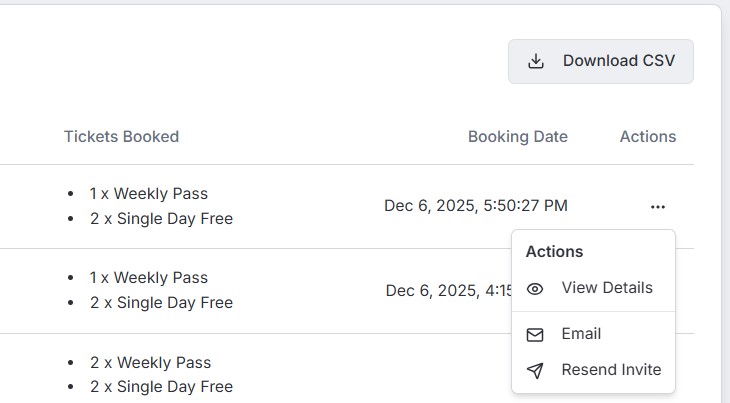
- In the "Attendees" tab of your event dashboard, locate the attendee record.
- Click the menu (3 dots) next to the attendee.
- Select "Resend Invite"—the system handles the rest.
Individual Email
Send targeted, one-to-one emails as needed. Ideal for personal queries or unique updates.
- From the Attendee List, click the 3-dot menu on an attendee row.
- Choose the "Email" option.
- Write and dispatch your custom message in the composer that appears.
Best Practices
- Stay within Mass Email's 1500-character limit to avoid delivery issues.
- Communicate responsibly—avoid spam by focusing on valuable, infrequent messages.
- Combine tools: Use Mass Email for broadcasts, Resend/Individual for specifics.
For any other queries, please contact us at sales@bookerrrr.com.