
Refund Approval Process
A simple, transparent system for managing attendee refunds requests.
Overview
Bookerrrr's refund process is a simple 2-step system designed for transparency. Attendees initiate requests, and you—as the organizer—review and decide. This ensures refunds align with your event's policy while keeping everyone informed.
Step-by-Step Guide
From attendee request to your final decision.
1
Step 1: Attendee Raises Request
- Attendees log into their Bookerrrr account to submit a refund request.
- They view your event's refund policy during submission.
- They can add a note explaining their reason (e.g., scheduling conflict).
- A "Pending" record is created, which the attendee can track in real-time.
2
Step 2: Organizer Reviews and Decides
Requests appear in your "Refund Requests" tab as a consolidated list. Review each one and take action directly:
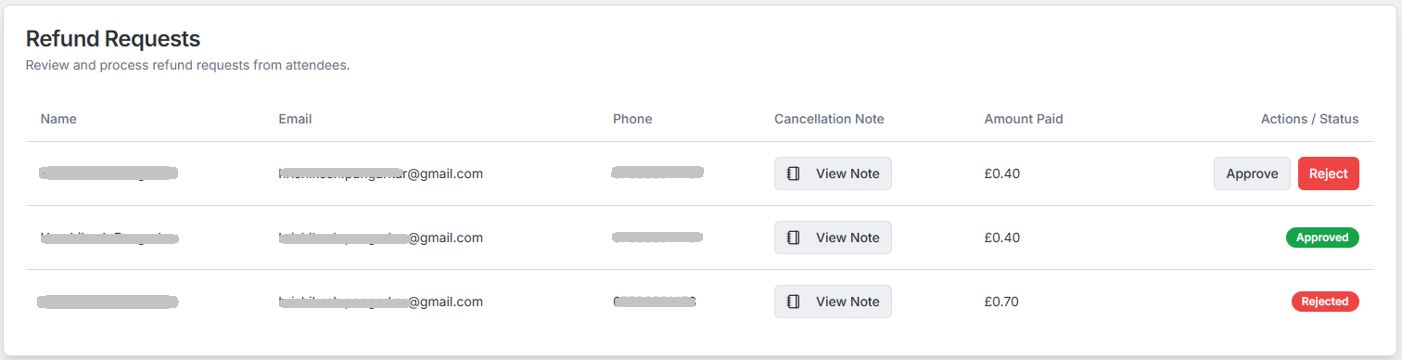
- Approve: Select if it fits your refund policy; add an optional approval note.
- Reject: Select if it doesn't qualify; add an optional rejection note.
- Submit your decision—notes become visible to the attendee immediately.
Important Note on Fund Transfers
Approval or rejection only logs the decision in the system. The actual fund transfer follows separately, according to Bookerrrr's standard reimbursement terms or your specific agreement with us.
Frequently Asked Questions
For more details or support, please contact us at sales@bookerrrr.com.